

My year didn’t start as I expected.
Some plans fell through, leading to an unexpected search for the right next role.1
I’ve been lucky throughout my career, always landing roles through my network rather than through traditional job applications. As such, my familiarity with job postings has mostly come from writing them and scouring competitors’ openings for insights into their next moves.
What strikes me now, as I sometimes scan dozens of postings per day, is that most positions require AI literacy and hands-on experience beyond asking ChatGPT for a banana bread recipe.
While I’m lucky to have a background in building search and recommendation products that leverage machine learning, I imagine many employers’ expectations don’t align with the average person’s experience level (though obviously any organisation aims to hire people who can be described as more than ‘average’).
I hear a lot from people (and companies) who feel worried they’ll get left behind.
The standard advice is: automate something in your life. But for people who’ve never done that, knowing what to automate, let alone how to, can feel overwhelming.
Here’s what you can do today.
Stop typing the same stuff over and over
How often do you type your email address, your phone number, your IBAN, or links to personal websites or socials? Or maybe there are other things you type out regularly.
Let’s automate these.
If you’re on Mac, go to your System Settings, select Keyboard, and then go to Text Replacements. Now set up small shortcuts to save yourself time typing. I prefer putting stuff in brackets, but you could also add a prefix like !
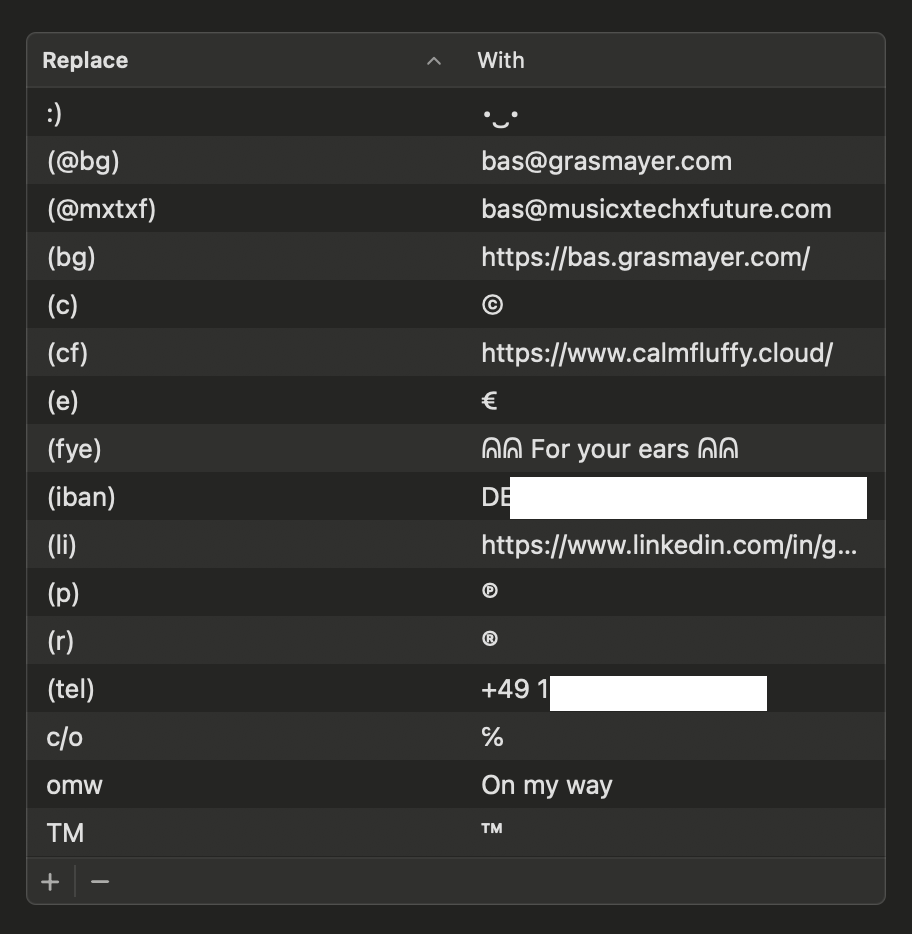
Bonus: if you’re signed into the same Apple ID on your iOS device, these shortcuts will also work there.
If you’re on Windows, it requires a bit more effort using AutoHotKey or Beeftext. You can ask an AI assistant for help.
Other things to put in there:
Calendar scheduling tools: if you use Cal.com or Calendly, you can create shortcuts for links to let people book meeting slots for certain lengths of time, e.g. (cal30) and (cal45) for 30 and 45-minute slots.
(lib) for “link in bio” and other stuff you might need for managing socials.
(bio) for a short 1-2 line biography.
Particular docs you link to frequently, e.g. employee onboarding docs, codes of conduct, Figma files, or Github repos.
If you’re a freelancer, things like what you do, what you’re currently working on, what your rates are (whatido) (current) (rates).
Formatting symbols like ✓ → ← •
Emoji combos you like for complimenting friends’ mixtapes 🔥🧯🚒👩🚒
And boom, that’s your first automation done.
These shortcuts are actually a simple form of automation. They follow a basic IF/THEN pattern that powers much more complex systems.
If… then…
Automation means that whenever a certain condition is met, an action is triggered. This is commonly phrased as IF/THEN.
With these simple text replacement automations, you’ve created the following:
IF (tel) is typed
THEN post my phone number instead
You can take this a lot further. Many of the tools we use have APIs that allow them to communicate with each other. For example, a productivity suite like Notion can communicate with Slack, so you may set up an automation that says IF a new ticket is created on this project board, THEN update the team in a specific Slack channel.
If two apps can’t directly speak to each other, you can use tools like IFTTT or Zapier to connect the dots. For instance, IF someone books a meeting through Cal.com, THEN create a prep task in your to-do app.
Sometimes, there are even custom tools built for specific APIs, like Smarter Playlists for Spotify, which I used years ago to build myself a global music radar.
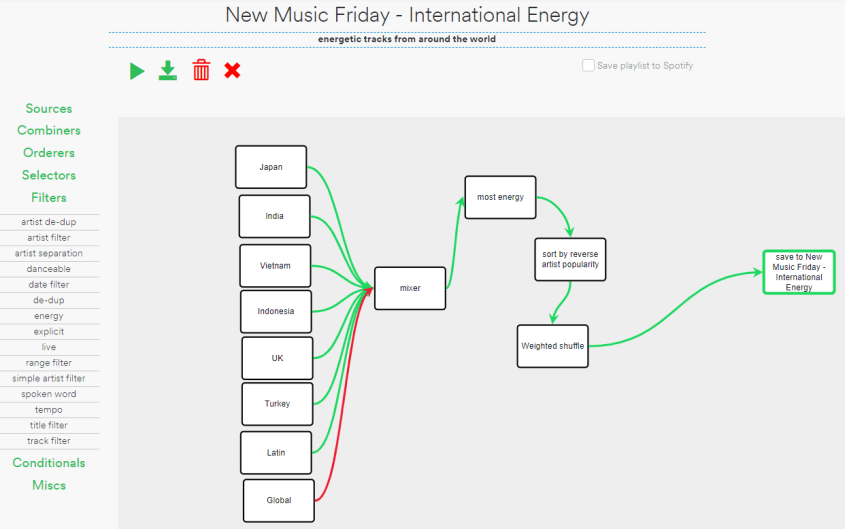
It would run once a week, put tracks from various New Music Friday playlists together, filter out bigger names by tossing everything out that’s also in the global playlist, removing anything low energy (not a fan of ballads), then apply some playlist ordering logic, after which it would update my existing playlist.
Phrased in IF/THEN, in very simplified form, you could think about it like:
IF the weekly run command is triggered
THEN grab all tracks from selected playlists
IF any of the tracks are present in the global playlist
THEN remove them from the batch
IF any of the tracks have a lower than x energy score
THEN remove them from the batch
So whether it’s stuff you do for fun, for work, or for administration, I’m sure you can find small automations to make your life easier or more fun, like blinking your smart lights whenever you complete a to-do list item.
Once you get used to automating the basics, you can start figuring out how to make these systems smarter by integrating AI with tools like n8n.
Let me know about what automations you have running that make your life better.
ᕱᕱ For your ears ᕱᕱ
I discovered Jefre Cantu-Ledesma’s Gift Songs through zensounds, which named it the Ambient Album of the Year 2025. Rightly so.
Never have I found an album that so immediately and strongly invokes a combined sense of wonder, calm, and meditativeness in me.
I can’t tell you how many times I’ve listened to it since first hearing it in December. Rather than trying to describe it, here are some words I wrote after listening to it in a wintry Berlin park.

If you’ve been wanting to work together, reach out. More on what I’m looking for in my LinkedIn post — I appreciate it a like or repost to increase its reach and my potential to have an impact in my wider network. <3
Truly a gem, this album, isn't it? Happy you are enjoying it. Love the poem.